Stop typing
USG reports.
Speak the findings. USGScribe writes them into MS Word or its own report editor, with the ultrasound terms and measurements right.
Free during early access. Windows 10 and 11, or Chrome and Edge on any computer.
Speaking is faster than typing
You speak at 150 words a minute. You type at 52.
Averages from the National Center for Voice and Speech and a study of 168,000 typists at Aalto University.
Keep your Word templates.
The Windows app types at your cursor, in MS Word or any other program. Your letterhead, your formats, your printer stay the same.
- 1
Click where the finding goes.
- 2
Press Ctrl Shift Space and speak.
- 3
Press it again to stop. Text appears each time you pause.
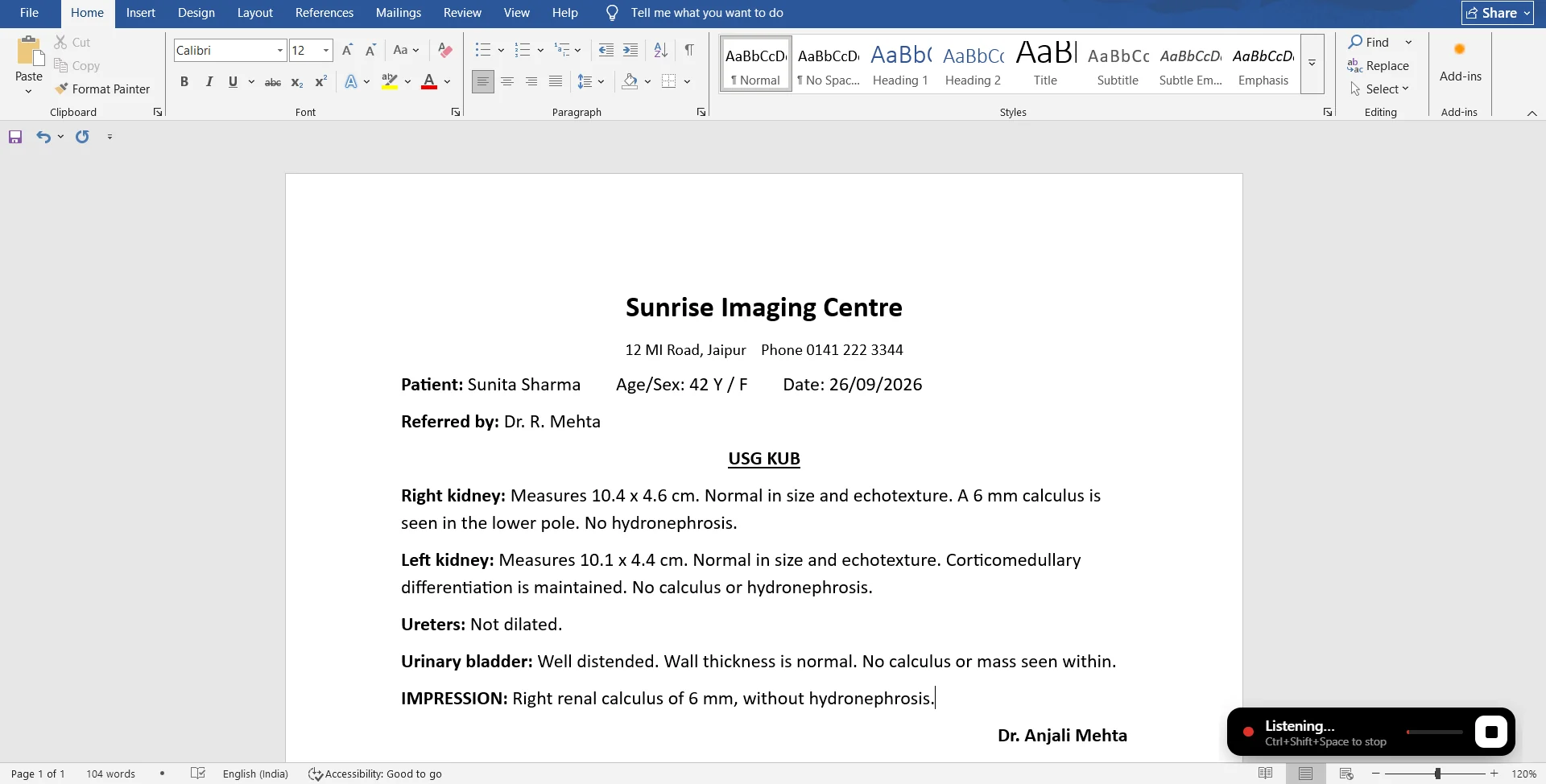
It writes it the way reports are written.
Numbers become measurements, spoken punctuation becomes punctuation, and short phrases become your standard sentences.
| You say | In the report |
|---|---|
| sixteen point two centimetres | 16.2 cm |
| ten point four by four point six centimetres | 10.4 x 4.6 cm |
| grade one fatty liver | grade I fatty liver |
| impression colon | Impression: |
| insert clinical correlation | Kindly correlate clinically. |
| replace liver … | Rewrites the LIVER line with what you say next |
| insert normal kidneys | Both kidneys are normal in size, shape, position and echotexture. Corticomedullary differentiation is maintained. No calculus or hydronephrosis seen on either side. |
Formats to start from.
Pre-filled with normal findings, so you only dictate what’s different. Each one is free to read and copy.
Questions
How is this different from the Dictate button in Word?
Word’s Dictate is general-purpose. USGScribe is set up for ultrasound reports: it knows the vocabulary (echotexture, hydronephrosis, BPD, AFI), writes measurements as 10.4 x 4.6 cm, uses Roman numerals for grades, and turns short phrases like “insert normal kidneys” into your full standard sentences.
Does it understand Indian English accents?
Yes. It uses Whisper, a speech model trained on millions of hours of speech in many accents, set up for Indian English and British spelling. There is no voice training step.
Does it work in software other than Word?
Yes. The Windows app types wherever your cursor is, so it also works in your clinic or hospital software, email and browsers.
Is it free?
Yes, during early access. No card, no sign-up, no trial timer.
What happens to patient data?
Reports written in the web app stay in your browser. The Windows app types straight into your document. Only the audio of your dictation is sent to be turned into text, and USGScribe does not store it. If you press Structure, the report text (not the patient details at the top) is sent to an AI model to be organised. Details are on the privacy page.
Does it need internet?
Yes. Speech recognition runs on a server, so a normal internet connection is needed while you dictate.
Windows says “Windows protected your PC”. Is it safe?
Windows shows that for new apps that are not yet code-signed. Choose “More info”, then “Run anyway”. The installer comes from USGScribe’s official download page on GitHub.
Is there a Mac version?
The web app works in Chrome or Edge on a Mac today. A Mac version of the Word app is in progress.
Dictate your next report.